Showing posts with label game art. Show all posts

Tuesday, August 20, 2019

Star Wars: The Old Republic -Asset Dump 01

Hi all!

Being how I've now moved on since my Contract at BioWare, I thought I'd post up some of the first assets I got to make for Star Wars: The Old Republic.

Note:
Under each image is a direct link to the asset on my ArtStation if you care to check it out further.

Asset 01:
This was part of my art test for the weapon/prop artist position.  The test was to see how I would not only build the asset, but also design something new that fit correctly into the Star Wars universe.  Being a fan of both weapons and Star Wars, I knew that most blasters start off with a WWII era of firearm with other parts of different weapons or scopes attached to make them look "sci-fi".
Asset 02:
Also part of the art test, this was pair of binoculars I created also of my own design.  Similar to the blaster, doing some research proved that previously created binoculars in the Star Wars films often started with a 60s-70s era of camera with additional parts glued over top.  So using Luke's binoculars from "A New Hope" as inspiration, I found a camera body I liked and then added some lenses and parts from appliances as well as some of the pieces used in the film versions of other binoculars.

Asset 03:
This was the very first thing I created once starting my contract on Star Wars: The Old Republic.  I was told to take inspiration from the "Siege Cannon" seen at the end of "The Last Jedi".  (Everyone's favorite SW film lol)  Beyond that, I had the pre-determined hand positions for this type of weapon and some direction from my supervisor, Brad Lewis, who helped me dial in the design.
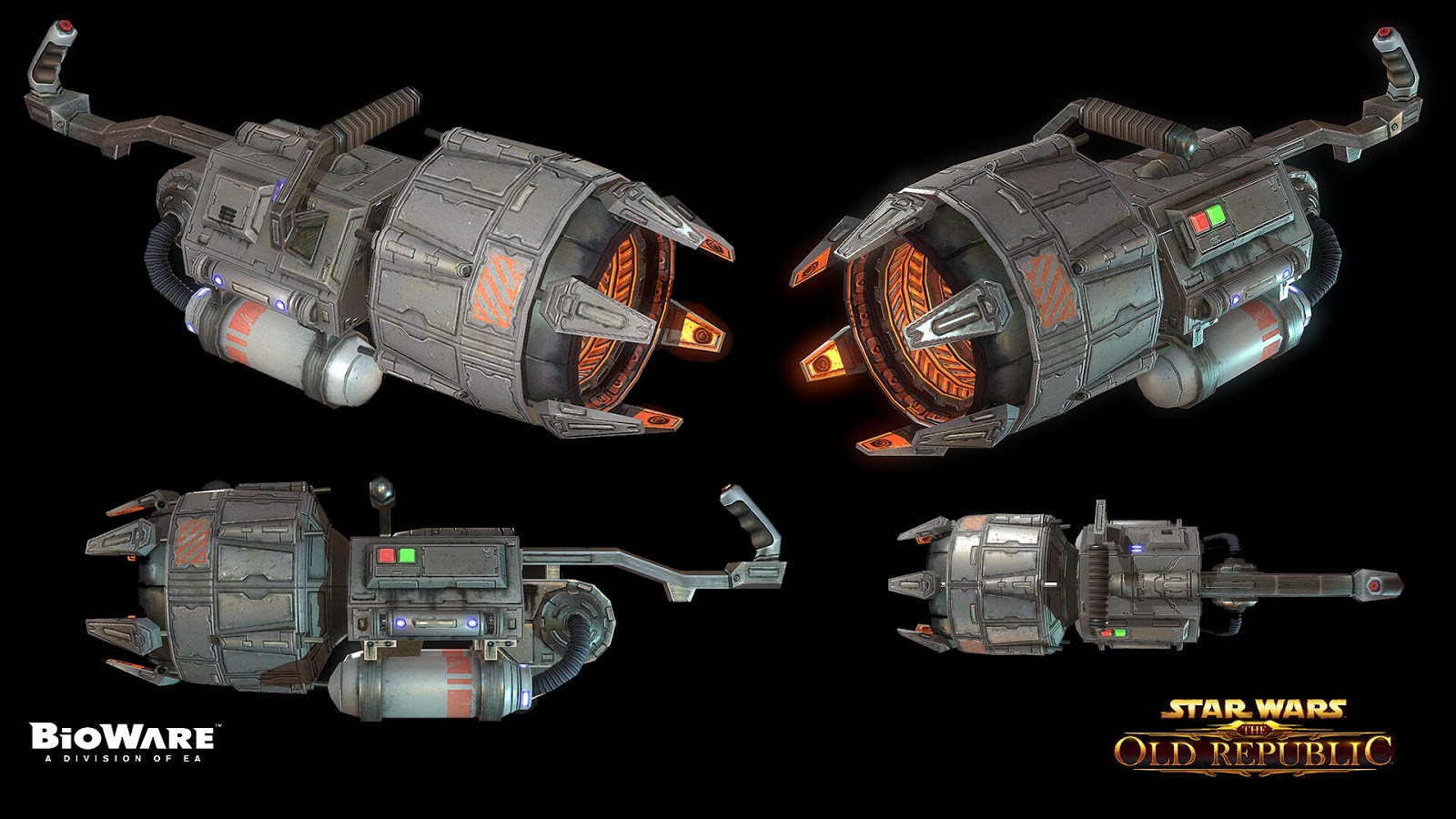
Asset 04:
Lastly for this post, is the first "mount" I created for the game.  This one was based on a couple well crafted, pencil sketches from Brad Lewis.  He gave me some freedom with the textures which I pulled inspiration from both the Y-Wing and the Snow Speeder seen in "The Empire Strikes Back".

More to come...
I have several more assets from my time at BioWare that I'll be sharing as time permits.  For those that don't know, I'm no longer with BioWare and wanted to wait awhile before showcasing some of the things I made last year.  I know BioWare has been under a lot of scrutiny in recent months for a multiple of reasons I won't get into here, however I hope like myself anyone reading this will continue to wish them the best in righting the ship and returning to making excellent products.


Tuesday, August 16, 2016

Photo Source Textures VS. Han Painted Textures

I have recently started a Block tradition at the school for creating a Link shield each class to talk about creating simple props for games. I have found that some students like this little asset because it allows them to play with the idea of making something in low-poly 3D with an asset they find very familiar.  I mean seriously, who doesn't want to make a Zelda asset?


This Block I went in a more gritty (realistic) approach to the Twilight Princess Link shield.  I used photos of wood, metals, and grime to edit together a PBR constructed material.  You can see that just by using photo sourced texture, it really makes the iconic shield look far more realistic and medieval than what we are used to seeing in most Zelda games. 

Here is the ArtStation post:


Last Block I did a much more stylized "N64" style version of Link's shield.  Lower poly count and very simple construction works nicely when coupled with hand painted textures that are deliberately trying to make the asset feel like it's from a "cartoony" world.  The asset pictured only uses a simple diffuse map which tends to work very well when going with this simple art direction.  Just as cool and as much fun to create as the realistic shield pictured above.  

If ;you enjoy texturing and are trying to branch into different art styles, try picking a simple game asset from one of your favorite game series and do something with it you haven't seen before.  Fun exorcise and really flexes those texture painting muscles. 

Here is the ArtStation post:


Tuesday, August 9, 2016

"Potato Masher! RUN!!!"

This is a low poly M24 grenade (WWII) that I created in front of my last class.


The lesson was on creating normal maps starting with a high poly to low poly bake using a standard 3D package.  Part 2 of the assignment is to go in and add the finer details using the xNormal Photoshop Filter and then overly the two normal maps together to create a single map with all the detail of both types of normal map creation.

Here is the ArtStation post:

https://www.artstation.com/artwork/9kJWW

Saturday, August 6, 2016

This is my ax... There are many like it but this one is game art...

Here is a low poly prop and texture I recently created in front of my class to discuss texture workflow and storytelling within your texture.

Modeled in Modo
Textured in Photoshop  

Texture Painted at 1024x1024
Marmoset Render 512x512 diffuse only


To create a good looking, realistic game asset, you first want to collect your images for the base materials.

Ask yourself these questions:
What is this asset made of?
How is this asset constructed?
Where has this asset been?

Once you've made those decisions, you can begin finding the right source images to create your base metal, plastic, wood, screws, bolts etc...  Now using PS, place/rotate all your source images to your assets UV shells.  Once everything is in place and seam free, you can begin adding additional shading that the images did not supply but you want to create based on your concept.

After you have a nice looking asset that looks new from the hardware store, it's then time to give your asset some personality.  This is where the "Where has this asset been?" question comes in.  Has this item been used as a weapon?  Has it never been used but been sitting in the back of an old truck or tool box for the past 5+ years?  These are the things that will help you decide if you need dirt, dust or blood...and how much!

With every asset you make, you'll want to get better at asking yourself or your art lead these questions and then use the answers to help push your texture to a more interesting place.

Sunday, September 7, 2014

Colt 1911 Game Model (Revised)


Another model from the vault of past goodies.  I originally made this 1911 model for a game idea where the player could customize and build their firearms and than use them at progressively more challenging shooting ranges.  Sort of a Hogan's Alley meets Gran Turismo.  The past renders I had of this asset were done with Maya's Mental Ray and not actually real-time as I had intended.  Now with current game engines and tools like Marmoset I am able to show off this pistol as it was meant to be seen.

Software Used:
  • Maya
  • Photoshop
  • Marmoset

AK-47 Game Model


Here is a low poly AK I made at my time at Cole Engineering.  The version we used on our project was a bit too low poly for portfolio use, so I took the time to add some polys where needed and updated the texture to something a bit more realistic and higher quality.

Software Used:
  • Maya
  • Photoshop
  • xNormal
  • Marmoset

Beretta M9 Game Model


A common favorite in the firearms world as well as the current military issued sidearm, the Beretta M9 is hands down the most iconic 9mm on the market today.  I had made a very low poly version of the M9 in my time at Cole Engineering, but wanted to make a FPS (higher poly) version of the pistol to better showcase my appreciation for this awesome firearm.

Software Used:
  • Maya
  • Photshop
  • xNormal
  • Marmoset

M14 Game Model


This is a model I started on awhile back but simply didn't get around to finishing until I found some time this week.  I love the Springfield Armory M1A and wanted to create a game model of it's original design, the M14.  Chambered in .308, the M14/M1A has been in service since WWII and is still looked at as one of the best semi-auto rifles on the market today.  It's like the 1911 of the rifle world.

Software Used:
  • Maya
  • Photoshop
  • xNormal
  • Marmoset

School Props: Turntables 1 & 2


This is a collection of assets I made at Cole Engineering for a test scene to be placed in Unreal Engine 4.  I have gathered the assets I created (high and low resolution model, color/specular/normal textures) and placed them onto this turntable for demo reel/portfolio purposes.  All props are low poly with LOD's and were used in a real time walk through rendered with Unreal Engine 4.


You can view these assets in their natural environment in the video below.


I worked closely with the talented Justin Wildhorn and Sorob Raissi, you can see examples of this project as well as more of Justin's work here: http://www.justinwildhorn.com 

...and check out  Sorob's work here: http://sorob.net

Software Used:
  • Maya
  • Photoshop
  • xNormal
  • dDo
  • Marmoset
  • Unreal Engine 4

Sunday, July 20, 2014

Altered Beast: Neff


This is my submission to the KKG Artbook from Gamers for Good.
http://www.gamersforgood.com/KKG-Artbook

Altered Beast was one of the lowest games on the list for submissions, and I have a great deal of fondness to both the Arcade and Genesis versions of the game.  I can't wait to see all the submissions once the book is put into print.

Good luck Kevin, we are all sending you the best of wishes in hopes that you beat this thing!  A big thanks to Gamers for Good and the Coopers for putting this all together.

Thursday, February 13, 2014

Undead Ed


I have been doing sketches of zombie cowboys for a few years now, and awhile back I thought...I should make some sort of character from this idea.  So this is just a little something I threw together for the fun of it.  I thought it might be cool to do this piece like a trading card, so who knows...maybe there will be more?

Wednesday, August 21, 2013

Just a girl and her tank!


I work with an interesting mix of military people and hard core gamers.  I wanted to make a PC desktop for my work station that reflected a bit of both sides.  One of my all time favorite arcade shooters is Metal Slug, so I was heavily inspired with the art from that game, leaning a bit more toward the Japanese art look for the character but going a bit more realistic with the tank.  Also the girl in this image is sporting a Glock 21...cause why not? 

Wednesday, July 24, 2013

Glock 30 Concepts


Here are a few variations of what I might do if I pick up a Glock 30 down the road.  I made it tan being how I'm strongly considering going with a tan and black two tone with my Mossberg 500, so I figure it may be cool to have them match.  This concept is based of the Gen 3 Glock 30 design.

The Glock 30 is chambered in .45acp, has a 3.78" barrel, weighs 23.99 oz and has a 10+1 capacity.

There is a ton of information out there on the Glock pistols and I already have one in my collection which is currently my carry gun and I'm excited to get another one at some point.  Although there are arguably better polymer handguns on the market, the Glock has been proven tough and able to perform under almost all conditions and for the money they are a great choice for an EDC weapon or nightstand gun.

Thursday, May 16, 2013

Mr. Skullhead: First ZBrush sculpt


Just got set up with a new work station at my job this week and the only software installed so far is ZBrush.  I hadn't touched ZBrush since 2007, and I had only done the most basic of tasks even back then.  One of my co-workers suggested while I'm waiting for Maya and Photoshop to get put on my new PC I might start learning ZBrush as we'll be using it more and more here at work.  He also suggested I try out something new to ZBrush called DynaMesh.  So Mr. Skullhead here is the result of me pushing and pulling some shape from a DynaMesh sphere.  Still a WIP, just something simple to get my feet wet in the big world of sculpting.

Tuesday, December 11, 2012

Project 1776 Lead Female Character


I have had a 2.5D side-scroller in my head for years now that I gave the code name "Project 1776".  I have pretty much lost hope in the idea of ever making the game, as making a game of its size just isn't realistic without a staff of talent.  I think many of us in the game development world love to dream about making our "perfect game", but the longer I work in the industry, the more I see just how much work and manpower it takes to make even the simplest of games, let alone something the size of extra large, 2.5D,  Metal Slug.  It just isn't possible while maintaining a full time job.

The basic premise of the game is that it would be a side-scrolling shooter (Contra, Metal Slug, Gunstar Heroes ext...) made in very high end 3D graphics but with the camera locked into a 2D angle, just like Street Fighter IV, Mortal Kombat and many of the Nintendo Wii games like New Super Mario Bros. and Donkey Kong Country Returns.  The gameplay would revolve around firearms and doing fancy combos while jumping, sliding and taking cover.  The story is loosely based around some of the popular conspiracy theorists and their ideas of a future where the government would fail us and there would be a revolution.  The game follows two young, new recruits to this rebellion against a corrupt government.  ...never decided on names for them, so we'll just call them Player 1 and Player 2.  :P 

So here is a concept of Player 2, the female lead character.  I'll likely share some more things from this idea over time, I still enjoy making characters and weapons for the game idea...just a fun excuse to make cool stuff. 

Wednesday, October 17, 2012

Resident Evil 5 Toons


Here is a set of RE5 toons that I'm finely getting around to posting.  I originally drew these back when the game first came out but they were never posted up or finished.  I dug them up last night, re-touched and colored them and thought it's due time they saw the light of day. 

"You were almost a Jill sandwich!"
                                -Barry Burton

Sunday, August 19, 2012

Axe Concepts


I had done some sketches for a Darksiders II contest a couple months back but never got around to creating the 3D model.  I came across those sketches and thought I should take the best ones and render them out for my 2D portfolio...so here they are! :)